

Pongbot Nova S Pro owners' review and discussion thread

This user has no status.
Member
Nov 2025
68
97
179
Nova Drill Control - 2.0
  • Wheels rpm values are now replaced with speed and spin as in the original app
  • New format of export/import CSV file
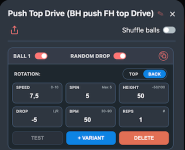
  • New RND (RaNdomDrop) option for each ball. Random drop point in the range + to - of configured Drop (eg. -5 to 5)
  • Drills can now be moved between custom categories using "Save as"
  • Shared drills can be downloaded to any custom category
  • Pause now in seconds (was ms)
You might need to factory reset settings.

Webclient: https://olanga.github.io/nova/
Webclient (rpm version): https://olanga.github.io/nova/1.3
Repository: https://github.com/olanga/nova
 
Last edited:
This user has no status.
Member
Dec 2025
9
2
33
Nova Drill Control - 2.0
  • Wheels rpm values are now replaced with speed and spin as in the original app
  • New format of export/import CSV file
  • New RND (RaNdomDrop) option for each ball. Random drop point in the range + to - of configured Drop (eg. -5 to 5)
  • Drills can now be moved between custom categories using "Save as"
  • Shared drills can be downloaded to any custom category
  • Pause now in seconds (was ms)
You might need to factory reset settings.

Webclient: https://olanga.github.io/nova/
Webclient (rpm version): https://olanga.github.io/nova/1.3
Repository: https://github.com/olanga/nova
Again amazing job @olanga , really appreciated. While I get myself a non apple device to test the app, I was having a look at your recent updates. Would it be possible to set up the frequency to steps every 5 rather than 10? This would allow to choose a lower frequency (less than 30 bpm), lets say 15 bpm? This would allow my 6 years old son to use the bot, since right now is too fast for him . 😁 Cheers
 
This user has no status.
Member
Nov 2025
68
97
179
Again amazing job @olanga , really appreciated. While I get myself a non apple device to test the app, I was having a look at your recent updates. Would it be possible to set up the frequency to steps every 5 rather than 10? This would allow to choose a lower frequency (less than 30 bpm), lets say 15 bpm? This would allow my 6 years old son to use the bot, since right now is too fast for him . 😁 Cheers
Hi @Panchete78, thank you. Frequency settings are taken directly from the original app, not sure if this can be changed.
As a workaround you can always define a drill with 1 active ball and change "Pause" to 2-5 seconds.
Cheers
 
  • Like
Reactions: Panchete78
This user has no status.
New Member
Oct 2018
1
0
1
what about the different positions of the nova from p1 to p9? would make sense to integrate it to a drill. fine works anyway
 
This user has no status.
Member
Nov 2025
68
97
179
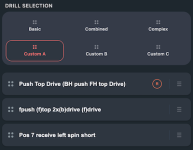
Nova Drill Control - 2.2
  • User Interface
    Simplified Layout:
    The UI now displays a single-line view for each drill.
    Drag-and-Drop Management: Easily reorder drill sequences or move drills between categories using drag-and-drop.
    Drill Names: Drill names now support up to 40 characters for better description.

    Configuration & Data
    Simplified ball rate settings:
    Replaced percentage-based frequency with Balls Per Minute (BPM) in the drill editor.
    Full Export: Export all drill types to a single CSV file, allowing easy backup and configuration sharing across multiple devices.

*Frequency vs bpm
0% = 30 bpm, 10% = 36 bpm, 50% = 60 bpm, 100% = 90 bpm

Webclient: https://olanga.github.io/nova/
Webclient (rpm version): https://olanga.github.io/nova/1.3
Repository: https://github.com/olanga/nova
 

Attachments

  • 1.png
    1.png
    52.2 KB · Views: 75
  • 1a.png
    1a.png
    76.8 KB · Views: 77
Last edited:
This user has no status.
New Member
Jan 2021
2
0
2
No, it does not work with smees GitHub version.
is this likely to change?

I recently purchased a Pongbot Nova S Pro, black and orange before finding out about these alternate controller builds. I very much like the idea of height adjustability within a drill sequence which the PongBot app doesnt support.

My Nova S Pro works with the Smee controller (https://smee.github.io/nova-s-custom-drills/index.html) but not really with the Olanga controller (https://olanga.github.io/nova/1.3/). Under the Olanga controller, only downloading drill JOB857 works.

I bought the Nova S Pro from Amazon and am debating returning it in order to buy a white Nova but if this can be avoided?

Really appreciate the work by all that has gone into this.
 
This user has no status.
is this likely to change?

I recently purchased a Pongbot Nova S Pro, black and orange before finding out about these alternate controller builds. I very much like the idea of height adjustability within a drill sequence which the PongBot app doesnt support.

My Nova S Pro works with the Smee controller (https://smee.github.io/nova-s-custom-drills/index.html) but not really with the Olanga controller (https://olanga.github.io/nova/1.3/). Under the Olanga controller, only downloading drill JOB857 works.

I bought the Nova S Pro from Amazon and am debating returning it in order to buy a white Nova but if this can be avoided?

Really appreciate the work by all that has gone into this.
As far as I know: the only one in this thread with a white nova is plunder.
So I don't think your problems with olangas app have to do with the nova s version.
 
This user has no status.
Member
Nov 2025
68
97
179
is this likely to change?

I recently purchased a Pongbot Nova S Pro, black and orange before finding out about these alternate controller builds. I very much like the idea of height adjustability within a drill sequence which the PongBot app doesnt support.

My Nova S Pro works with the Smee controller (https://smee.github.io/nova-s-custom-drills/index.html) but not really with the Olanga controller (https://olanga.github.io/nova/1.3/). Under the Olanga controller, only downloading drill JOB857 works.

I bought the Nova S Pro from Amazon and am debating returning it in order to buy a white Nova but if this can be avoided?

Really appreciate the work by all that has gone into this.
Hi,
do you try https://olanga.github.io/nova/ ?
Maybe check this page from other device using Chrome. Try to do factory reset which deletes local storage and all settings.
If you edit a drill in let's say Basic category do you see that ball has all parameters configured or just zeros?
Check also previous version https://olanga.github.io/nova/1.3

Cheers
 
This user has no status.
Member
Nov 2025
68
97
179
@smee0815, @olanga:
one question regarding the protocol with nova for my understanding. After starting the drill, you send the balls data to the nova. How often do you resend balls data?
Do the Original-App send it only once because there is not random option?
It sends one packet containing all the balls of the drill to the robot and once robot is ready sends it again.
 
This user has no status.
Member
Nov 2025
45
20
68
Hello,
I also want to ask the other users of olanga's App:
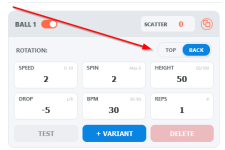
do we need the "rotation"-line/option?
2025-12-17-19_20_31-nova-drill-control-%E2%80%94-mozilla-firefox-png.39545

I think it is more easier to handle, if we use only the field "Spin".
A positiv value is topspin and a negativ value (e.g. -3) is backspin.
What do you mean?

This is also always a pitfall for me when using pongbot app: I add a ball and type in a Spin value and start the drill. Some balls later (after playing) I realized it was the "wrong" spin. I forget to set Top/Back correct because I have to set it somewhere else; not where I expect it.

Or we can do it like that:
Unbenannt.png


best regards
 

Attachments

  • 2025-12-17 19_20_31-Nova Drill Control — Mozilla Firefox.png
    2025-12-17 19_20_31-Nova Drill Control — Mozilla Firefox.png
    12.9 KB · Views: 407
  • Like
Reactions: plunder
This user has no status.
Member
Nov 2025
68
97
179
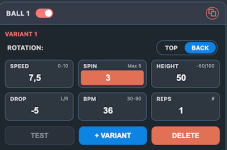
For now I will add visual highlight of a backspin. If switch is set to back > spin background turns red/orange.
Removing the switch is tempting as it makes UI even simpler. Problem is the existing data based on top/back switch.
Need to see.
 

Attachments

  • backspin.png
    backspin.png
    49.9 KB · Views: 49
  • Like
Reactions: The_mfk_Dude
This user has no status.
Member
Nov 2025
45
20
68
For now I will add visual highlight of a backspin. If switch is set to back > spin background turns red/orange.
Removing the switch is tempting as it makes UI even simpler. Problem is the existing data based on top/back switch.
Need to see.
why is this a problem? if you want, you can keep the data internally as it is.
or: is the changing of the switch-position (in UI) no possible solution?
 
This user has no status.
Member
Nov 2025
68
97
179
why is this a problem? if you want, you can keep the data internally as it is.
or: is the changing of the switch-position (in UI) no possible solution?
As I said I will look into it. I'm absolutely open for ideas and try to implement things which I like and make sense. Other things I will not.
Version 2.2e is now available (spin highlight plus bigger STOP button during the drill). SHIFT reload the page.
 
This user has no status.
Member
Nov 2025
45
20
68
Hello olanga,

thank you, that you are open for ideas.
Thats in my head:
1) as (I suppose) most of us use a tablet or phone, there should be buttons to increase and decrease the values.
2) I would like to use predefined balls like I mentioned before in post #181.
I would like to predefine some balls (spin, speed, height),
It should be possible to define a ball like:
eg. Name "Konter1" with spin 5, speed 4, height 30.
Then I chose the predef. ball in a drill from a drop-down list-box:
predef.png

there is no comfort necessary for the predefining.
I can do it in a textfile!

greetings
 
This user has no status.
Member
Nov 2025
68
97
179
Hello olanga,

thank you, that you are open for ideas.
Thats in my head:
1) as (I suppose) most of us use a tablet or phone, there should be buttons to increase and decrease the values.
2) I would like to use predefined balls like I mentioned before in post #181.

It should be possible to define a ball like:
eg. Name "Konter1" with spin 5, speed 4, height 30.
Then I chose the predef. ball in a drill from a drop-down list-box:
View attachment 39556
there is no comfort necessary for the predefining.
I can do it in a textfile!

greetings
Ok, basically some sort of template for spin, speed and height combinations.
 
Top