



Both Webclients handle drill and loop logic on app side. This is the only way to implement scatter option and allow to have multiple options/variants for a single ball. Original app works differently. It sends a single command with all parameters of a drill so no changes during the execution by robot are possible (I'm not aware at least).Hi @Panchete78, with the Olanga web app, you can use these workarounds even though they aren't the best:
@olanga, in the Smee client version, there is a "Remove pause" button that does exactly what Panchete78 and I mean (the motors keep running and the Nova Pongbot doesn't wait). It would be fantastic if you could include this in your client as well.Cheers!
- For single-ball drills: Edit the drill by entering a REP value equal to the desired number of repetitions.
- For multi-ball drills: Unfortunately, you need to add multiple balls (even by copying their settings). Since this is likely time-consuming via the web editor, it might be easier to create a .csv file (copying the text n times) and then import it.
edit:i've verified that the smee web client actually introduces a small delay between multi-ball drills, though this doesn't happen with single-ball drills
Pongbot Nova S Pro owners' review and discussion thread
- Thread starter plunder
- Start date


You are using an out of date browser. It may not display this or other websites correctly.
You should upgrade or use an alternative browser.
You should upgrade or use an alternative browser.

@Dr. X I'm happy the app is useful and you like it.Olanga, your app is brilliant! Thank you so much for developing it and sharing it with us. I just bought you a Kofi, my friend. I encourage others who use this awesome app to do the same.
Next on my list is the mirror function.
If you own a Nova S Pro, this app is mandatory. Too bad more people don't know about it.
Looking forward to figuring out what the mirror function does
The only thing that should make it more useful for me is if there were a way for me to run it on my iPhone. Otherwise it's damn near perfect.
Looking forward to figuring out what the mirror function does
The only thing that should make it more useful for me is if there were a way for me to run it on my iPhone. Otherwise it's damn near perfect.
Hi, this an arbitrary limit. Do you think somebody would need more drills (>20) per category?Olanga, I'm curious: why is there a limit on there number of custom drills?
OK, with a next update in 2 weeks probably, I will increase the limit to 50 per custom category. I hope this will be enough. Limit is defined in 3 places (ui, main and in editor.js).I do ☺️
Oh yes. 150 should be enough even for hoarders like me. Thank you.OK, with a next update in 2 weeks probably, I will increase the limit to 50 per custom category. I hope this will be enough. Limit is defined in 3 places (ui, main and in editor.js).
This user has no status.
This user has no status.
New Member

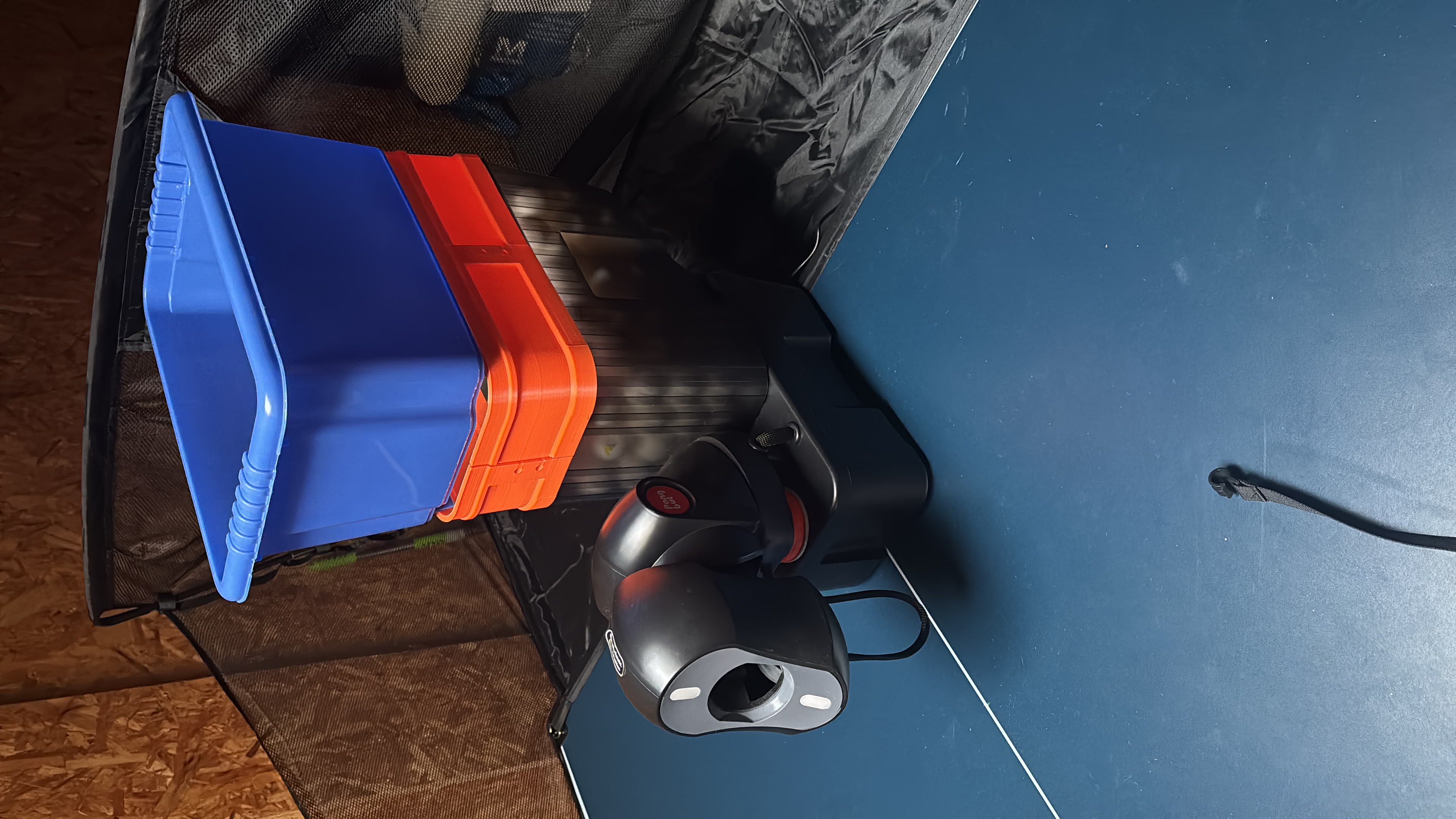
I’ve added extra ball capacity to my nova s pro (nearly 400 balls), but when it’s full I often get ‘misfires’ until the number of balls goes down to around 250 balls or so.
I think I saw someone else mention this. Does anyone have any tips on how to prevent this please?
Thanks
I think I saw someone else mention this. Does anyone have any tips on how to prevent this please?
Thanks
says
rejoicing in rbpon 🆚 robipon

says
rejoicing in rbpon 🆚 robipon
Member

you could try to install a sequence of ramps such that every ball has to follow a meandering path from your top to the top (rim) of the original feeding container. gpt thinks that would work for sure.
((( interesting side fact, since 2025-10-01 i had only 2 robi2pon sessions other than testing the webclient for testing's sake. most of my solopon sessions have been rbpon, since then. one can also do both in a single session: 1h warmup with rbpon, followed by 1.5h+ robi2pon .. which calls for double motivation 😆 )))
((( interesting side fact, since 2025-10-01 i had only 2 robi2pon sessions other than testing the webclient for testing's sake. most of my solopon sessions have been rbpon, since then. one can also do both in a single session: 1h warmup with rbpon, followed by 1.5h+ robi2pon .. which calls for double motivation 😆 )))
This user has no status.

This user has no status.
Member

This user has no status.

This user has no status.
Member
Yes for side spin u need to turn the robot head to other positions. With nova S u cant mix drills which r side spin and then pure under or overI can't change the rotation on the app. It's only top and under. Am I missing anything?
View attachment 39759
This user has no status.
This user has no status.
Member
I don't want to mix drills. I just want to select the side spin. They are not selectable in the app. I can manually rotate them but app won't let me select it.Yes for side spin u need to turn the robot head to other positions. With nova S u cant mix drills which r side spin and then pure under or over
Others seem to do it with tomahawk.
This user has no status.
This user has no status.
Member
Have u used an already created drill with it now being on side spin. U can use an already created drill for under and top and then tilt head.I don't want to mix drills. I just want to select the side spin. They are not selectable in the app. I can manually rotate them but app won't let me select it.
Others seem to do it with tomahawk.
U will have to create a new drill for side spin once u turn the head.
says
rejoicing in rbpon 🆚 robipon
says
rejoicing in rbpon 🆚 robipon
Member
Hi, i am on pongbot app v1.0.11 and android v8.1.0, and even with an unpowered AND offline nova, i can launch the app >> Devices >> Nova S Pro >> View Offline >> Tabletop Mode >> Custom Drills >> Add New >> Select Robot Position (e.g. pos8, 0° degrees, Confirm) >> "Device offline, combo test disabled" >> Combo Rotation Type: Left & Right (or any other of the four radio buttons).app won't let me select it
If your app caht reproduce this behaviour, then something's off with your .. erh .. app 🤷♀️
Troubleshooting, have you tried the app on other android bluetooth devices (your tablet, phone2, phone3, etc)?
This user has no status.
New Member
Hi,
First post here. Table tennis savvy but not tech savvy and mostly an iphone guy. First language is french but enough English to thank all the great contributors here. Trying to customize Nova S pro with Smee and Olanga apps. Being an iphone user, bought a small Lenovo tablet with Android 15 and Chrome. Smee app seems to be working well now (was not able to connect on iphone).
Olanga app version 1.3 connects to Nova S pro, can open edit drill window but all the robot parameters cases are blank no matter the drill, so no way to modify a predefined drill.
In the current Olanga version, app connects to Nova S pro but a long push on any of the predefined drill button doesn't even seem to be able to open the "edit drill" window.
Any idea of what I could be doing wrong ??
Enjoying Smee app but would like to be able to try the added and still evolving capabilities of Olanga app
Thanks
First post here. Table tennis savvy but not tech savvy and mostly an iphone guy. First language is french but enough English to thank all the great contributors here. Trying to customize Nova S pro with Smee and Olanga apps. Being an iphone user, bought a small Lenovo tablet with Android 15 and Chrome. Smee app seems to be working well now (was not able to connect on iphone).
Olanga app version 1.3 connects to Nova S pro, can open edit drill window but all the robot parameters cases are blank no matter the drill, so no way to modify a predefined drill.
In the current Olanga version, app connects to Nova S pro but a long push on any of the predefined drill button doesn't even seem to be able to open the "edit drill" window.
Any idea of what I could be doing wrong ??
Enjoying Smee app but would like to be able to try the added and still evolving capabilities of Olanga app
Thanks
Last edited:
This user has no status.

Hi @Franck , welcome. Please try to do a factory reset from the menu. It deletes the local storage.Hi,
First post here. Table tennis savvy but not tech savvy and mostly an iphone guy. First language is french but enough English to thank all the great contributors here. Trying to customize Nova S pro with Smee and Olanga apps. Being an iphone user, bought a small Lenovo tablet with Android 15 and Chrome. Smee app seems to be working well now (was not able to connect on iphone).
Olanga app version 1.3 connects to Nova S pro, can open edit drill window but all the robot parameters cases are blank no matter the drill.
In the current Olanga version, app connects to Nova S pro but a long push on any of the predefined drill button doesn't seem to be able to open the "edit drill" window.
Any idea of what I could be doing wrong ??
Enjoying Smee app but would like to be able to try the added and still evolving capabilities of Olanga app
Thanks
This user has no status.
New Member
Hi Olanga,Hi @Franck , welcome. Please try to do a factory reset from the menu. It deletes the local storage.
After seeing in other posts that a simple factory reset could fix same kind of problem, did it 3-4 times. Unfortunately it did nothing for me. Thanks anyway for pour response. Any other idea or suggestion ?
Similar threads

- Replies
- 13
- Views
- 3K
- Replies
- 0
- Views
- 3K

- Replies
- 8
- Views
- 1K
- Replies
- 9
- Views
- 4K



