Nova Trainer 0.1.0-beta.2 – everything it can do
Hi all,
here is a complete overview of what Nova Trainer can do right now:
Unofficial web app for the Pongbot Nova S Pro table tennis robot (beta).
nova-premium.pages.dev
Works in Chrome or Edge (Windows, Mac, Android) and on iPhone / iPad with the free Bluefy browser. No login, no server: everything stays in your browser.
What makes it special
* Unlimited, seamless drills
The robot only takes short ball lists, so the app runs it in an endless loop and rewrites the balls it hasn't played yet while it is playing. A drill can have as many balls as you like, and repetitions run without any gap. The robot reports a shot counter, so the app always knows exactly which ball was played. Slow or lost Bluetooth messages shouldn‘t cause wrong balls.
* Keeps going when the screen turns off
The screen stays on during a drill. If the phone still locks or you switch apps, the robot keeps playing the right pattern with no double balls, and the app picks up exactly where the robot is when you come back.
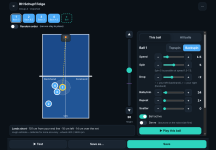
* Visual drill editor
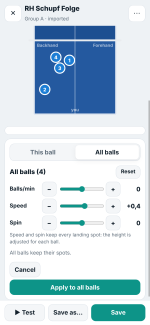
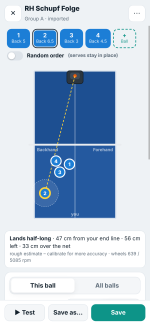
You see the table from above and drag each ball to where it should land. The app adjusts the height first and changes the speed only if the height can't reach the spot. For every ball it shows where it lands, how far it clears the net and whether it bounces twice (with a dotted line to the second bounce). Balls that would go into the net or out are marked red.
* Fast drill building
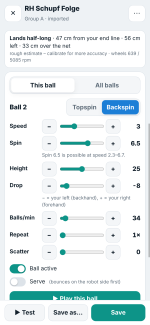
All balls are shown as chips above the table. You can duplicate a ball, add variants, reorder balls by drag & drop, test a single ball, and use random order (serves stay in place) and scatter. Speed goes in 0.1 steps. Switching a ball to backspin starts with values that land (speed 1.8, backspin 5.5, height 40).
* All balls at once
Change speed, spin or balls/min for the whole drill in one go. Every ball keeps its landing spot, and the app adjusts height and drop for you.
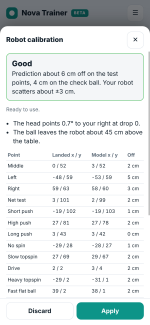
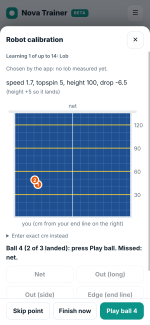
* Calibration for your robot and table
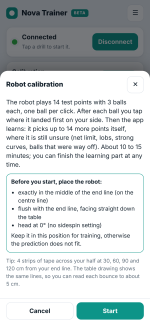
The app searches the limits of your robot:
- For topspin, no spin and backspin: the net limit, the long limit, a loop, and a ball aimed at the middle of your half.
- Serves get their own tests: the flattest serve that still lands, plus five aimed serves (short and long, backspin and topspin, no spin). After a miss the model works out whether the ball was too flat or too short.
- "Complete" mode adds balls spread over every setting the robot allows, from very slow to very fast, maximum top- and backspin, lobs, far left and right.
- Topspin and backspin are learned separately, and short balls are checked for a second bounce (Yes / No).
- About 30 balls (Standard) to 55 balls (Complete). At the end you see the limits it found and how accurate it is for each kind of ball.
After that, the editor's preview fits your own robot. Your drill settings are always sent to the robot unchanged.
And also
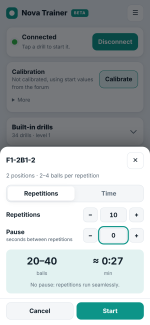
* Start dialog: play by repetitions or by time, with or without a pause. The app shows how many balls and minutes that will be and remembers your last choice.
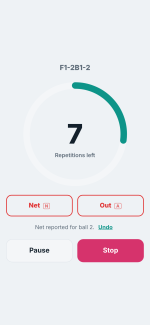
* Net / Out buttons during training (or N / A on a keyboard): the editor then shows which ball failed and suggests a fix.
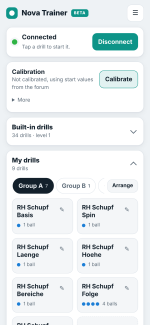
* Built-in drills: 34 drills in 3 levels, plus your own groups A / B / C.
* CSV import / export, compatible with the existing CSV format.
* Phone, tablet and PC, in portrait and landscape (on phones in landscape the table turns sideways to use the space), with light, dark and court themes.
* A log in the menu with exact times, very handy if something doesn't work.
Thank you
This app would not exist without smee's protocol work, olanga's Drill Control and wiki, plunder's test series and all your reports here in the forum.
This is still a beta. Feedback, ideas and bug reports are very welcome right here in this thread. If something goes wrong, please copy the log from the menu into your post.
nova_fan