Pongbot Nova S Pro owners' review and discussion thread

This user has no status.
Hey @olanga,

first of all, thanks for your great web app!

I managed to get it working on iOS. With a few small code adjustments, it now runs perfectly in the Bluefy browser on the iPhone.

I've also implemented a workaround for the delayed first ball in each set.

Since it's your web app, I don't want to share a link to my modified version here. Instead, I've posted the solution as an issue in your GitHub repo.

Feel free to implement it!
 
  • Like
Reactions: inshane and plunder
This user has no status.
Hi all,


over the last weeks a lot of knowledge came together here: smee's protocol work, olanga's Drill Control and wiki, plunder's test series and many of your reports (first ball too late, 3–4 balls on one side, iPhone problems …). I took all of that and built a new web app from scratch: Nova Trainer.


Works in Chrome (Windows, Mac, Android) and on iPhone/iPad with the Bluefy browser. No login, no server. Everything stays in your browser.


Key features


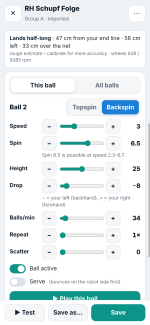
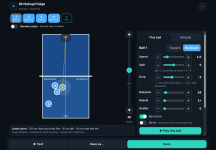
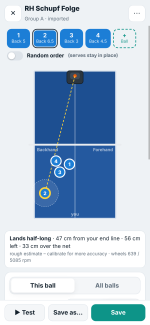
  • Visual drill editor: you see the table from above and drag each ball to where it should land. The app adjusts the height first and changes the speed only if the height can't reach the spot. Balls that would go into the net or out are marked red.
  • Flight model: for every ball the editor shows where it lands, how far it clears the net and whether it bounces twice.
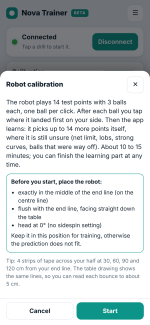
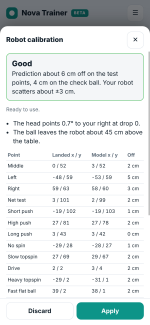
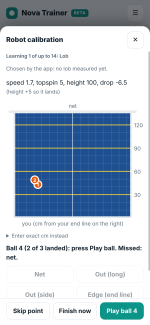
  • Guided calibration (about 15 min): 14 fixed test points, then a learning phase in which the app picks the next balls itself. These are net limits, lobs, wide curves and balls that were way off. Into the net means the next ball goes higher, too long means lower, and serves are handled correctly. Afterwards the predictions fit your robot.
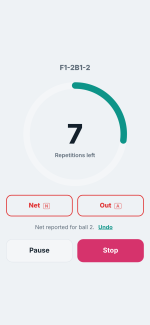
  • Net/Out buttons during training: tap Net or Out (or press N/A on a keyboard) right after a bad ball. The editor then shows which ball failed and suggests a fix. The reports can also refine your calibration.
  • Seamless repetitions: with pause 0 the wheels never stop. Balls are sent one shot ahead, which fixes the late first ball and the "3–4 balls on one side" problem with variable reps.
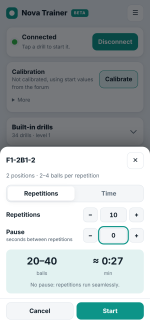
  • Start dialog: choose repetitions or time and the pause. The app shows how many balls and minutes that will be.
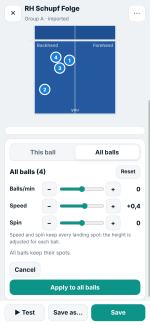
  • All balls at once: change balls/min, speed or spin for the whole drill. Every ball keeps its landing spot.
  • Editor details: speed in 0.1 steps, drop slider, variants, scatter, random order (serves stay in place), reorder by drag & drop, duplicate, test a single ball.
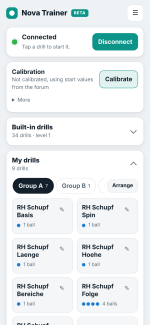
  • Built-in drills: 34 drills in 3 levels, plus your own groups A/B/C.
  • CSV import/export: compatible with the existing CSV format.
  • Works on phone, tablet and PC, in portrait and landscape.

What do you think about the idea?
 

Attachments

  • 02_start_dialog.png
    02_start_dialog.png
    191.1 KB · Views: 47
  • 05_editor_controls.png
    05_editor_controls.png
    233.5 KB · Views: 43
  • 08_calibration_start.png
    08_calibration_start.png
    309.3 KB · Views: 46
  • 03_training_net_out.png
    03_training_net_out.png
    76.6 KB · Views: 34
  • 06_all_balls.png
    06_all_balls.png
    166.9 KB · Views: 40
  • 11_tablet_editor_dark.png
    11_tablet_editor_dark.png
    351.2 KB · Views: 41
  • 01_home.png
    01_home.png
    192.4 KB · Views: 41
  • 10_calibration_result.png
    10_calibration_result.png
    256.8 KB · Views: 37
  • 04_editor.png
    04_editor.png
    181.5 KB · Views: 38
  • 09_calibration_learning.png
    09_calibration_learning.png
    176.3 KB · Views: 44
This user has no status.
Member
Oct 2025
15
30
68
Hi all,


over the last weeks a lot of knowledge came together here: smee's protocol work, olanga's Drill Control and wiki, plunder's test series and many of your reports (first ball too late, 3–4 balls on one side, iPhone problems …). I took all of that and built a new web app from scratch: Nova Trainer.


Works in Chrome (Windows, Mac, Android) and on iPhone/iPad with the Bluefy browser. No login, no server. Everything stays in your browser.


Key features


  • Visual drill editor: you see the table from above and drag each ball to where it should land. The app adjusts the height first and changes the speed only if the height can't reach the spot. Balls that would go into the net or out are marked red.
  • Flight model: for every ball the editor shows where it lands, how far it clears the net and whether it bounces twice.
  • Guided calibration (about 15 min): 14 fixed test points, then a learning phase in which the app picks the next balls itself. These are net limits, lobs, wide curves and balls that were way off. Into the net means the next ball goes higher, too long means lower, and serves are handled correctly. Afterwards the predictions fit your robot.
  • Net/Out buttons during training: tap Net or Out (or press N/A on a keyboard) right after a bad ball. The editor then shows which ball failed and suggests a fix. The reports can also refine your calibration.
  • Seamless repetitions: with pause 0 the wheels never stop. Balls are sent one shot ahead, which fixes the late first ball and the "3–4 balls on one side" problem with variable reps.
  • Start dialog: choose repetitions or time and the pause. The app shows how many balls and minutes that will be.
  • All balls at once: change balls/min, speed or spin for the whole drill. Every ball keeps its landing spot.
  • Editor details: speed in 0.1 steps, drop slider, variants, scatter, random order (serves stay in place), reorder by drag & drop, duplicate, test a single ball.
  • Built-in drills: 34 drills in 3 levels, plus your own groups A/B/C.
  • CSV import/export: compatible with the existing CSV format.
  • Works on phone, tablet and PC, in portrait and landscape.

What do you think about the idea?
Sounds interesting. Do you have a link?
 
This user has no status.
Nova Trainer 0.1.0-beta.2 – everything it can do

Hi all,

here is a complete overview of what Nova Trainer can do right now:


Works in Chrome or Edge (Windows, Mac, Android) and on iPhone / iPad with the free Bluefy browser. No login, no server: everything stays in your browser.

What makes it special

* Unlimited, seamless drills
The robot only takes short ball lists, so the app runs it in an endless loop and rewrites the balls it hasn't played yet while it is playing. A drill can have as many balls as you like, and repetitions run without any gap. The robot reports a shot counter, so the app always knows exactly which ball was played. Slow or lost Bluetooth messages shouldn‘t cause wrong balls.

* Keeps going when the screen turns off
The screen stays on during a drill. If the phone still locks or you switch apps, the robot keeps playing the right pattern with no double balls, and the app picks up exactly where the robot is when you come back.

* Visual drill editor
You see the table from above and drag each ball to where it should land. The app adjusts the height first and changes the speed only if the height can't reach the spot. For every ball it shows where it lands, how far it clears the net and whether it bounces twice (with a dotted line to the second bounce). Balls that would go into the net or out are marked red.

* Fast drill building
All balls are shown as chips above the table. You can duplicate a ball, add variants, reorder balls by drag & drop, test a single ball, and use random order (serves stay in place) and scatter. Speed goes in 0.1 steps. Switching a ball to backspin starts with values that land (speed 1.8, backspin 5.5, height 40).

* All balls at once
Change speed, spin or balls/min for the whole drill in one go. Every ball keeps its landing spot, and the app adjusts height and drop for you.

* Calibration for your robot and table
The app searches the limits of your robot:
- For topspin, no spin and backspin: the net limit, the long limit, a loop, and a ball aimed at the middle of your half.
- Serves get their own tests: the flattest serve that still lands, plus five aimed serves (short and long, backspin and topspin, no spin). After a miss the model works out whether the ball was too flat or too short.
- "Complete" mode adds balls spread over every setting the robot allows, from very slow to very fast, maximum top- and backspin, lobs, far left and right.
- Topspin and backspin are learned separately, and short balls are checked for a second bounce (Yes / No).
- About 30 balls (Standard) to 55 balls (Complete). At the end you see the limits it found and how accurate it is for each kind of ball.
After that, the editor's preview fits your own robot. Your drill settings are always sent to the robot unchanged.

And also

* Start dialog: play by repetitions or by time, with or without a pause. The app shows how many balls and minutes that will be and remembers your last choice.
* Net / Out buttons during training (or N / A on a keyboard): the editor then shows which ball failed and suggests a fix.
* Built-in drills: 34 drills in 3 levels, plus your own groups A / B / C.
* CSV import / export, compatible with the existing CSV format.
* Phone, tablet and PC, in portrait and landscape (on phones in landscape the table turns sideways to use the space), with light, dark and court themes.
* A log in the menu with exact times, very handy if something doesn't work.

Thank you
This app would not exist without smee's protocol work, olanga's Drill Control and wiki, plunder's test series and all your reports here in the forum.

This is still a beta. Feedback, ideas and bug reports are very welcome right here in this thread. If something goes wrong, please copy the log from the menu into your post.

nova_fan
 
says rejoicing in rbpon 🆚 robipon
Member
Sep 2024
387
238
1,294
Read 2 reviews
@nova_fan Congratulations to such a deeply developed web app, i would say the most sophisticated design we've seen so far, amazing!
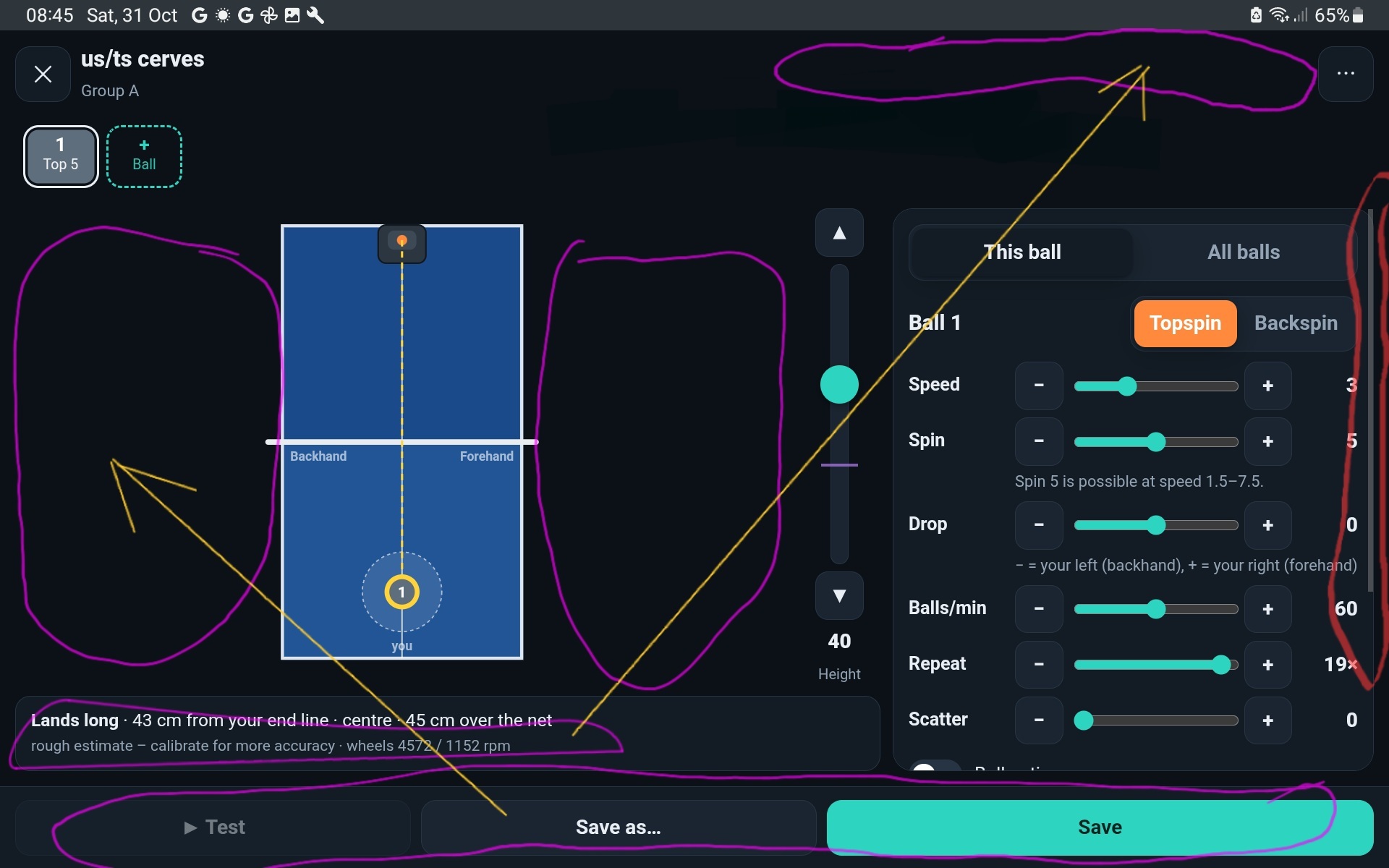
I haven't tested it yet but will give a serious shot soon, and it might draw me back to using the Nova at all ((I stopped using the Nova ever since i got the Omni)). I appreciate the android landscape view mode (or short: landscape view) so that the ball settings page gets split into 2 halves side by side (y) . Landscape view seems to be dependent on screen resolution. What i love and appreciate about the Powerpong app and the Epad S: on their ball settings page, there's no scrolling involved. Maybe you could consider rearranging the buttons for an optimized UX, e.g. placing the three buttons <Duplicate - Add variant - Delete ball> to the right of the Height slider (1x3 column) and placing the three buttons <Test - Save as... - Save> to the left of the table (1x3 column), or placing all six buttons to the left of the table (1x6 column). The UX objective should be to have a landscape view on an Android device at a minimum screen resolution with no scrolling needed (for the ball settings). To reach this goal, we caht waste screen space. Currently, there is much unused space to the left and right of the table, while i must scroll a lot back and forth in the ball settings, even in landscape view.

ewfp65cy.jpg


To me, UX is the most important aspect if i use a product long term or not. The easier to handle, the less fuss, the more likable, the more chances that i keep using the product in future, beyond the initial curiosity phase.

Thanks a lot for your efforts, keep up the fantastic work!! 🤩
 
Last edited:
This user has no status.
Maybe you could consider rearranging the buttons for an optimized UX
Thanks for your input!

The new version with the reworked landscape view is live now. I don't have an Android device myself, so I tested it with the device emulation in Chrome. On phones like the Galaxy or the Pixel, all settings of a ball should now fit on one screen in landscape without scrolling. Space was tight there, so I had to shorten a few labels.
The same applies to tablets. Here the app should work without scolling in the editor, both portrait and landscape.

It would be great if you could let me know how it works on a real device.
 
Last edited:
  • Like
Reactions: plunder
says rejoicing in rbpon 🆚 robipon
Member
Sep 2024
387
238
1,294
Read 2 reviews
It would be great if you could let me know how it works on a real device.
Thanks for realizing my suggestion! Yes, landscape view works great on all my Android devices (phones, tablets), with no more scrolling 👍 . As in the previous screenshot shown, i also figured out how to get rid of the nbd "title row" <Nova Trainer (title) - nova-premium.pages.dev (subtitle)>, when i open the ball settings page in landscape view. Here for example a screenshot of my Powerpong Omega tablet which has a 1024 x 600 pixel resolution (apparently users could adjust the Chrome browser's setting "Zoom" versus the Android's general setting "Screen zoom"/"Display size"/"Screen size"/"Screen scaling"/"Display scaling" or similar in order to adjust how the webapp appears on screen, very cool):
chromeapp.gif


In landscape view, i'd suggest that the parameter values be placed above the slider, and not right-aligned because the "+" symbol is right-aligned too: when i tap on the "+" symbol with my fat finger, i cannot see its changing value, nor the corresponding changes in the interactivity of the other values (Speed , Spin , Height), which are interdependent.

The bottom-left text line "Lands half-long , 90 cm from your ..." is ~clear to understand but too long to fit: the text line gets cut off. Instead, how about introducing 2 dashed lines along the table edge lines to track the position of the landing spot (Cartesian coordinates)? Here we go:

1793591844429.png


So far i did the full 23-step procedure of the calibration "Install Wizard" (enjoying it!🤩). I found a reversible way to overlay the grid whenever i want:

ncufj7sl.jpg

q34qjhg2.jpg


... and would suggest that for each step the robot shoots out 3 (or 4 or 5) balls in ~rapid succession, so that the user could pinpoint the 'average' landing point with more confidence ... since a landing spot always comes with variance due to etc., instead of me clicking <Didn't see it> - <Play ball> over and over again. For an install wizard, how about a button to go back 1 step (= automatically erase the current and previous step, in order to start the previous step afresh)?

The balls i use with the Nova are a mix of Joola Weinixiun Huieson Powerpong, AND i still use the rubber band mod on my wheels. [I re-checked, the advantage of the rubber band mod is that the wheels have so much more grip ((and doht get clogged, doht get altered by age/wear/temperature, never need replacement, etc)) (((the only disadvantage was that possibly etc)))] — I am mentioning this because it affects the calibration and the Nova's accuracy on my system.

I did a test robi2pon session with your Nova Trainer app ("NT app") and am very pleased that everything works neatly. Some observations:

1) the balls generated by +Var, e.g. ball4a and ball4b, do not have a Scatter parameter anymore oic. I guess that makes sense: either ball4 has a Scatter parameter or it has clearly defined variants 4a vs 4b.
2) after starting a drill in landscape view, the Stop and Pause buttons are not in view.
3) after a drill has ended, the app automatically returns to home (= the webapp homepage). instead, the app should stay in the drill start screen, so that the user needs only 1 tap to restart the drill.
4) during the calibration procedure, some balls are meant to land short near the sides of the table. there would be a second bounce if the table were wider. so should i answer yes or no to the question of whether there was a second bounce?
5) does or should the calibration Quick check improve and finetune the existing calibration? i did several subsequent runs through the Quick check procedure, and sometimes the Result says 'model recalculated', but when i re-run the Quick check again (and again and etc), there are still long balls which land out, etc. In other words, i never manage to get a run through Quick check which consumes exactly 9 balls, even though the model got recalculated several times.

 
Last edited:
This user has no status.
Update: Nova Trainer 0.1.0-beta.3 https://nova-premium.pages.dev/

Ball settings without scrolling
* Phones in landscape: all settings of a ball now fit on one screen. The sliders are in two columns, and Test / Save are in the header (Save as is in the ⋯ menu).
* Tablets and computers get the same compact two-column settings, in portrait and landscape.
* Each value now sits right next to its name (e.g. "Speed 2") instead of above the + button, so your finger no longer covers it while you tap.
* The table keeps its size for every ball (the text line below it no longer wraps).

Position on the table
* Rulers outside the table: the left edge shows cm from your end line, and your end line shows cm from the centre line. Dashed lines from the selected ball point to both rulers, and the values are shown there, so they are never hidden by the ball.
* New "Grid" button on the table: a 10 cm grid on your half, with the 30 / 60 / 90 / 120 cm lines highlighted like tape strips.
* Short balls show a dotted line to the second bounce.

During and after a drill
* In landscape, Pause and Stop are now always visible (progress ring on the left, buttons on the right).
* When a drill ends or you stop it, its start dialog opens again with your last settings. One tap on "Play again" restarts it.
* The drill length in time mode is now set in seconds.

Calibration
* Undo: "↶ Undo" takes back the last ball, even several in a row, and you can mark it again.
* New option "3 balls per step": the robot plays the same ball three times, and you tap the middle of where they landed. In my simulator tests this made the calibration about a third more accurate on a robot with a lot of scatter (mixed balls, modded wheels). It needs three times the balls, so it is off by default.
* "Bounced twice on your side?" means twice on the table. If a short ball leaves the table at the side, the answer is "No".

Quick check, rebuilt
The old quick check used fixed settings, so some balls went out even with a good calibration. Now:
* 5 balls (topspin, no spin, backspin, fast topspin, serve), each aimed by your calibration at a different spot.
* You see how far off each one was.
* "Save and refine" re-tunes only what drifts over time (exit speed, angle and aim) from these balls.
* In my tests it settled within a few runs: 11 cm, then 7 cm, then 3 cm off, with exactly 5 balls from the second run on.
 
says rejoicing in rbpon 🆚 robipon
Member
Sep 2024
387
238
1,294
Read 2 reviews
In future i could imagine a having a setting in the 🥪 sandwich menu which addresses handedness (right-handed vs left-handed player) because this would switch the labeling of "forehand" and "FH" in the UI.
Also a global setting which addresses the initial countdown of 3 sec, before a drill even starts.

I'll test the new calibration procedure (thx!) today and train this month with all(!) pre-programmed drills, editing the balls settings to my liking on the fly, hoping to stay in the flow:
at 15C basement temperature 🥶, it is crucial to stay warm\sweat continuously and not get deterred by fiddling with slow software controls (cf. Pongbot original phone app login\unsnappiness).

I'll also test the calibration procedure with my 🤖 robi3 (= my new unused spare Nova unit, ofc with new unmodded wheels) and exclusively Donic balls. It'll be curious 🧐 then to compare the 2 calibration result screenshots side by side (robi2 vs robi3).

((( funny fact, on robi4 (= my Omni) there's no need to mod the wheels. at extreme spin, the wheels get clogged too initially but after a while they get unclogged by themselves and stay cleanish. I caht figure out under which conditions\parameters the Omni wheels unclog themselves, it's wonderful and remains a mystery. this phenomenon makes me 🤔 think that maybe in the long run the Nova wouldn't need wheel maintenance either? since nobody else uses modded Nova wheels, maybe their wheels unclog themselves eventually too like my Omni wheels?
How to clog Nova wheels?? ... just run side-spin cerves at extreme spin for 60min and you'll see and notice 😤 )))

The NT app is also the best tool for every Nova owner to really learn about (and learn to accept) the Nova's ball quality production limits: the range of different ball qualities is rather or somewhat limited (i.e. more so than with the Omni -- yet another mystery), and after years 😉 of robi2pon the advanced player could want for a wider range of ball quality.

Fantastic convincing webapp @nova_fan with high usability, i like it very much! i'll continue to test and report. robi2pon ftw! Thanks 🙏🏼 for all your hard work
 
Last edited:
This user has no status.
Update: Nova Trainer 0.1.0-beta.3 https://nova-premium.pages.dev/

Ball settings without scrolling
* Phones in landscape: all settings of a ball now fit on one screen. The sliders are in two columns, and Test / Save are in the header (Save as is in the ⋯ menu).
* Tablets and computers get the same compact two-column settings, in portrait and landscape.
* Each value now sits right next to its name (e.g. "Speed 2") instead of above the + button, so your finger no longer covers it while you tap.
* The table keeps its size for every ball (the text line below it no longer wraps).

Position on the table
* Rulers outside the table: the left edge shows cm from your end line, and your end line shows cm from the centre line. Dashed lines from the selected ball point to both rulers, and the values are shown there, so they are never hidden by the ball.
* New "Grid" button on the table: a 10 cm grid on your half, with the 30 / 60 / 90 / 120 cm lines highlighted like tape strips.
* Short balls show a dotted line to the second bounce.

During and after a drill
* In landscape, Pause and Stop are now always visible (progress ring on the left, buttons on the right).
* When a drill ends or you stop it, its start dialog opens again with your last settings. One tap on "Play again" restarts it.
* The drill length in time mode is now set in seconds.

Calibration
* Undo: "↶ Undo" takes back the last ball, even several in a row, and you can mark it again.
* New option "3 balls per step": the robot plays the same ball three times, and you tap the middle of where they landed. In my simulator tests this made the calibration about a third more accurate on a robot with a lot of scatter (mixed balls, modded wheels). It needs three times the balls, so it is off by default.
* "Bounced twice on your side?" means twice on the table. If a short ball leaves the table at the side, the answer is "No".

Quick check, rebuilt
The old quick check used fixed settings, so some balls went out even with a good calibration. Now:
* 5 balls (topspin, no spin, backspin, fast topspin, serve), each aimed by your calibration at a different spot.
* You see how far off each one was.
* "Save and refine" re-tunes only what drifts over time (exit speed, angle and aim) from these balls.
* In my tests it settled within a few runs: 11 cm, then 7 cm, then 3 cm off, with exactly 5 balls from the second run on.
I am new to to the app, can't wait to try it in the weekend. Thanks for the effort.
 
  • Like
Reactions: plunder
This user has no status.
New Member
Jan 2026
4
0
6
Update: Nova Trainer 0.1.0-beta.3 https://nova-premium.pages.dev/

Ball settings without scrolling
* Phones in landscape: all settings of a ball now fit on one screen. The sliders are in two columns, and Test / Save are in the header (Save as is in the ⋯ menu).
* Tablets and computers get the same compact two-column settings, in portrait and landscape.
* Each value now sits right next to its name (e.g. "Speed 2") instead of above the + button, so your finger no longer covers it while you tap.
* The table keeps its size for every ball (the text line below it no longer wraps).

Position on the table
* Rulers outside the table: the left edge shows cm from your end line, and your end line shows cm from the centre line. Dashed lines from the selected ball point to both rulers, and the values are shown there, so they are never hidden by the ball.
* New "Grid" button on the table: a 10 cm grid on your half, with the 30 / 60 / 90 / 120 cm lines highlighted like tape strips.
* Short balls show a dotted line to the second bounce.

During and after a drill
* In landscape, Pause and Stop are now always visible (progress ring on the left, buttons on the right).
* When a drill ends or you stop it, its start dialog opens again with your last settings. One tap on "Play again" restarts it.
* The drill length in time mode is now set in seconds.

Calibration
* Undo: "↶ Undo" takes back the last ball, even several in a row, and you can mark it again.
* New option "3 balls per step": the robot plays the same ball three times, and you tap the middle of where they landed. In my simulator tests this made the calibration about a third more accurate on a robot with a lot of scatter (mixed balls, modded wheels). It needs three times the balls, so it is off by default.
* "Bounced twice on your side?" means twice on the table. If a short ball leaves the table at the side, the answer is "No".

Quick check, rebuilt
The old quick check used fixed settings, so some balls went out even with a good calibration. Now:
* 5 balls (topspin, no spin, backspin, fast topspin, serve), each aimed by your calibration at a different spot.
* You see how far off each one was.
* "Save and refine" re-tunes only what drifts over time (exit speed, angle and aim) from these balls.
* In my tests it settled within a few runs: 11 cm, then 7 cm, then 3 cm off, with exactly 5 balls from the second run on.
Hello @nova_fan and thank you for taking the time to develop this app!!

I wasn't using the robot so much, and I am very happy that you did this amazing piece of software for free!!

I have only one request, and I think it's very useful for all the users. I like to position the robot depending on the exercise, but I see the robot has to be in the middle always.

For example, for Falkenberg it's ideal that the ball comes from the backhand as it's usually how this pattern is performed. I wouldn't dare to pivot in a real match if the ball comes from the middle, as they can open the angle so much more.

I guess that if I ignore the middle and place it in the backhand the visual UX would be misleading, wouldn't it? I will try this afternoon though

Do you think it's doable and an interesting feature to add?
 
This user has no status.
Update: Nova Trainer 0.1.0-beta.3 https://nova-premium.pages.dev/

Ball settings without scrolling
* Phones in landscape: all settings of a ball now fit on one screen. The sliders are in two columns, and Test / Save are in the header (Save as is in the ⋯ menu).
* Tablets and computers get the same compact two-column settings, in portrait and landscape.
* Each value now sits right next to its name (e.g. "Speed 2") instead of above the + button, so your finger no longer covers it while you tap.
* The table keeps its size for every ball (the text line below it no longer wraps).

Position on the table
* Rulers outside the table: the left edge shows cm from your end line, and your end line shows cm from the centre line. Dashed lines from the selected ball point to both rulers, and the values are shown there, so they are never hidden by the ball.
* New "Grid" button on the table: a 10 cm grid on your half, with the 30 / 60 / 90 / 120 cm lines highlighted like tape strips.
* Short balls show a dotted line to the second bounce.

During and after a drill
* In landscape, Pause and Stop are now always visible (progress ring on the left, buttons on the right).
* When a drill ends or you stop it, its start dialog opens again with your last settings. One tap on "Play again" restarts it.
* The drill length in time mode is now set in seconds.

Calibration
* Undo: "↶ Undo" takes back the last ball, even several in a row, and you can mark it again.
* New option "3 balls per step": the robot plays the same ball three times, and you tap the middle of where they landed. In my simulator tests this made the calibration about a third more accurate on a robot with a lot of scatter (mixed balls, modded wheels). It needs three times the balls, so it is off by default.
* "Bounced twice on your side?" means twice on the table. If a short ball leaves the table at the side, the answer is "No".

Quick check, rebuilt
The old quick check used fixed settings, so some balls went out even with a good calibration. Now:
* 5 balls (topspin, no spin, backspin, fast topspin, serve), each aimed by your calibration at a different spot.
* You see how far off each one was.
* "Save and refine" re-tunes only what drifts over time (exit speed, angle and aim) from these balls.
* In my tests it settled within a few runs: 11 cm, then 7 cm, then 3 cm off, with exactly 5 balls from the second run on.
Had a session with the app today, quite like it. But a bit confused about how calibration works. And I was not able to export all drills on iphone (Bluefy).
 
says rejoicing in rbpon 🆚 robipon
Member
Sep 2024
387
238
1,294
Read 2 reviews
and bug reports are very welcome right here in this thread.
minor "cosmetic" bug in UI. in Built-in drills, e.g. Basic:Level2: Push BH, when i add a ball2 and turn on Random for the 2-ball-drill, then at Home 🏡, Level1: Push BH and Level3: Push BH get tagged "Random" too, although they consist of ball1 only (single ball drill).

nbd
 
Top